Personnel Reports
A personnel report shows a person's inspection results over a selected period. Use it to see the person's pass rate, the inspection types they were evaluated on, any observations they were responsible for, and the findings that come up most often for them, their Work Center, and their Organization.
A tenant administrator turns on Personnel Reports, and it applies to every Organization under the tenant. Your role also needs permission to view personnel reports. If you don't see it in the main menu, ask your administrator.
Open the personnel report list
- In the main menu, under Reports, click Personnel Reports
The list shows the people in your Organization. You can't switch to another Organization.
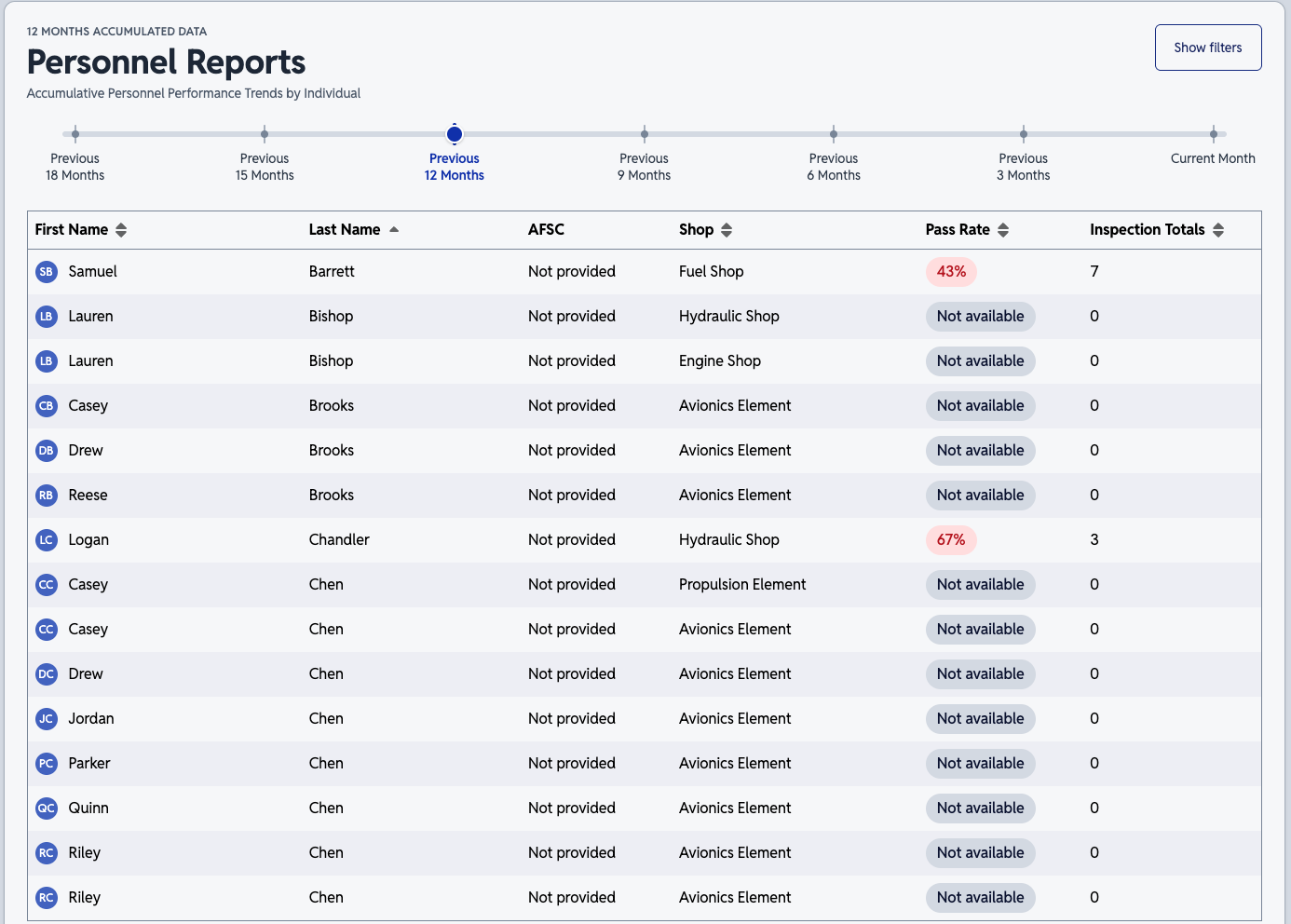
The list has these columns:
- First Name and Last Name
- The person's name. Click either name to open that person's report
- AFSC
- The person's Air Force Specialty Code (AFSC). If they don't have one, you see a placeholder in the column
- Work Center
- The Work Center the report covers
- Pass Rate
- The person's pass rate for the period, shown as a whole percentage. The badge shows a not-available label if the person has no pass rate
- Inspections
- The number of completed inspections in the period
Click a column heading to sort by it. On mobile, each person appears as a card with their name, pass rate, Work Center, and number of inspections. Click a card to open the report.
Choose a period
Use the slider above the list to set the report period. Periods use whole calendar months.
Read a person's report
Click a person's name to open their report.
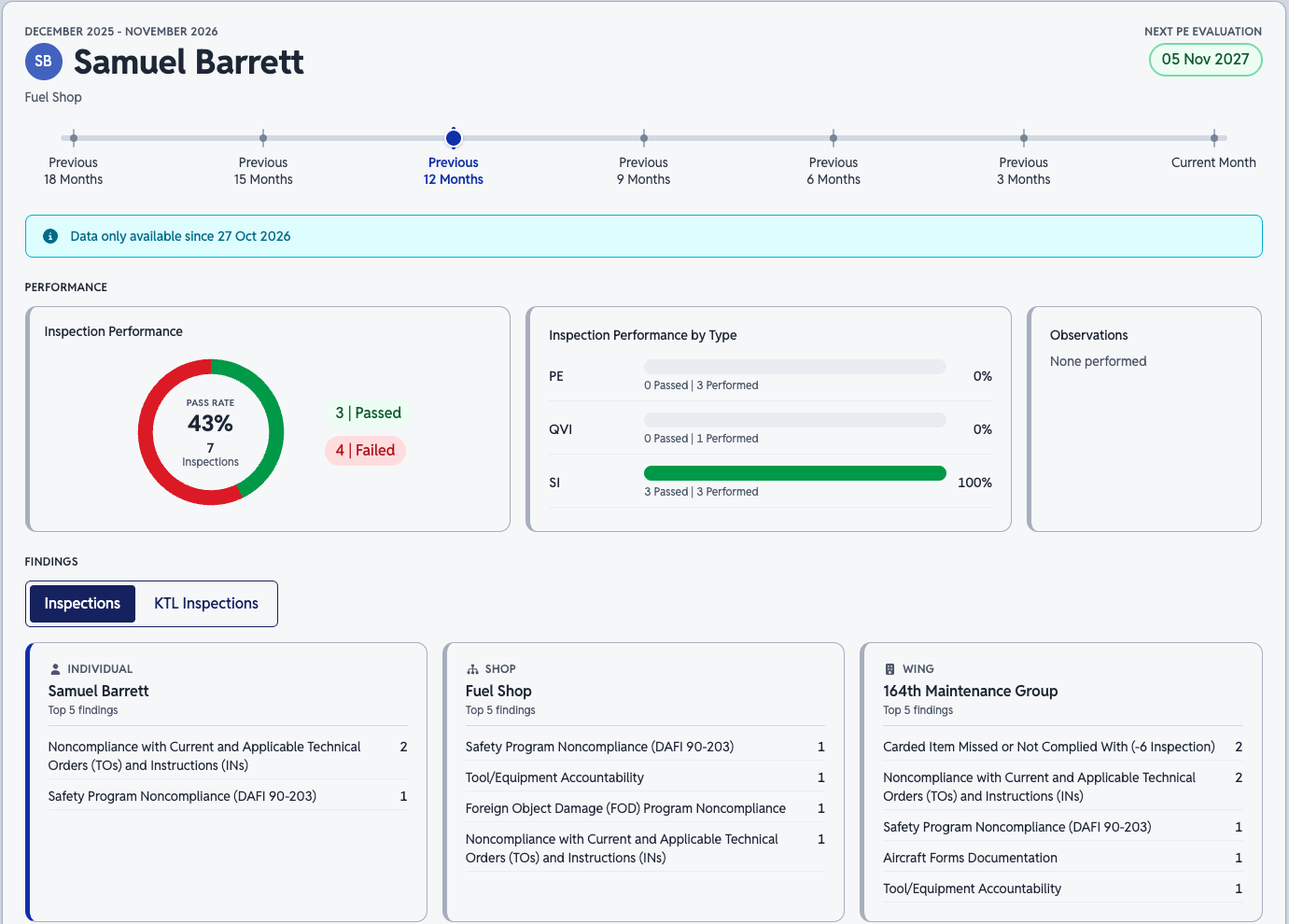
Inspection performance
The chart shows the person's pass rate with badges for the number of inspections that passed and failed.
Pass rate = passed inspections ÷ total inspections × 100
For example, a person has three passed inspections and four failed inspections, so seven in total. The pass rate is 3 ÷ 7 × 100, or about 43%.
Inspection performance by type
This card lists each type of inspection the person was inspected on, in alphabetical order. Each row shows:
- The type name, or its alias if the type has one
- A bar for the pass rate
- How many inspections passed out of how many were performed
- The pass rate
Click a row to see the inspections behind it. See See the records behind a number.
If the person had no inspections in the period, the card says that none were performed.
If your organization uses Quality Control (QC) inspections, the card lists QC types too. QC inspections count toward the pass rate and inspection totals, the same as planned inspections.
Observations
This card shows the number of observations documented against the person during the period. The observations are listed by type. Click the card to see the observation details. If the person has no observations, the card shows an empty message and doesn't open.
Top findings
Three lists show the five most frequent findings for:
- The person
- The person's Work Center
- The person's Organization
Use the lists to compare the person's most common findings with those of their Work Center and Organization.
If your organization uses QC inspections, a toggle above the lists switches between Inspection and QC findings.
See the records behind a number
You can open the completed records that make up the inspection and observation cards. Each opens in a window over the report.
Inspections
- In the Inspection Performance by Type card, click the row for an inspection type
- In the window, review the list of completed inspections. Each row shows the date, the result, the Work Center, and the number of findings
- Click a row to see that inspection's details, including its findings
Each inspection type has its own tab. If Rebuttals are turned on for your organization, the details also show any rebuttals on the findings.
Observations
- Click the Observations card
- In the window, review the list of observations
- Click a row to see the observation's details, including its reference and narrative
On mobile, the window shows the list or the details, one at a time.
What the report counts
- Only completed inspections count. QC inspections count the same as planned inspections
- Observations don't count toward the pass rate or inspection totals, because they aren't inspections
- Observations appear after they reach Complete status
- Records count for the period you select, in whole calendar months
- The lists include only records for the person in the report's Work Center
- Nothing before the date the report began counting is included
See Dashboard Metrics for the quarter-to-date view of your own work, and Observations for how observations move through their statuses.